Export Yielding Rules for a Selected Date Range
Stay allows users to specify a date range when exporting the yielding rules available at a property. The selected date range can have a maximum of 31 days.
To export the yielding rule sets, users must click the Export button in the Yielding Rule Import/Export screen (Settings ➜ Rates ➜ Yielding ➜ Import/Export ➜ Export). When clicked the Set Range pop-up screen appears. The following message and fields are displayed in this pop-up screen: Select a date range to export yield rule with the start and end date - maximum of 31 days.
|
Field |
Description |
|---|---|
|
From |
The start date for exporting the yield rule sets. This is a mandatory field that allows users to select past or future dates. The selected date can be a maximum of 3 years in the past or future from the current property date. |
|
To |
The end date for exporting the yield rule sets. This is a mandatory field that allows users to select past or future dates. The selected date can be a maximum of 3 years in the past or future from the current property date. The maximum duration between the start and end dates is 31 days. |
|
Export |
This button is enabled for selection only when both start and end dates are configured. When clicked, the yield rule sets that are active within the selected date range are exported. |
|
Cancel |
When clicked, the export process is canceled, and the pop-up screen is closed. |
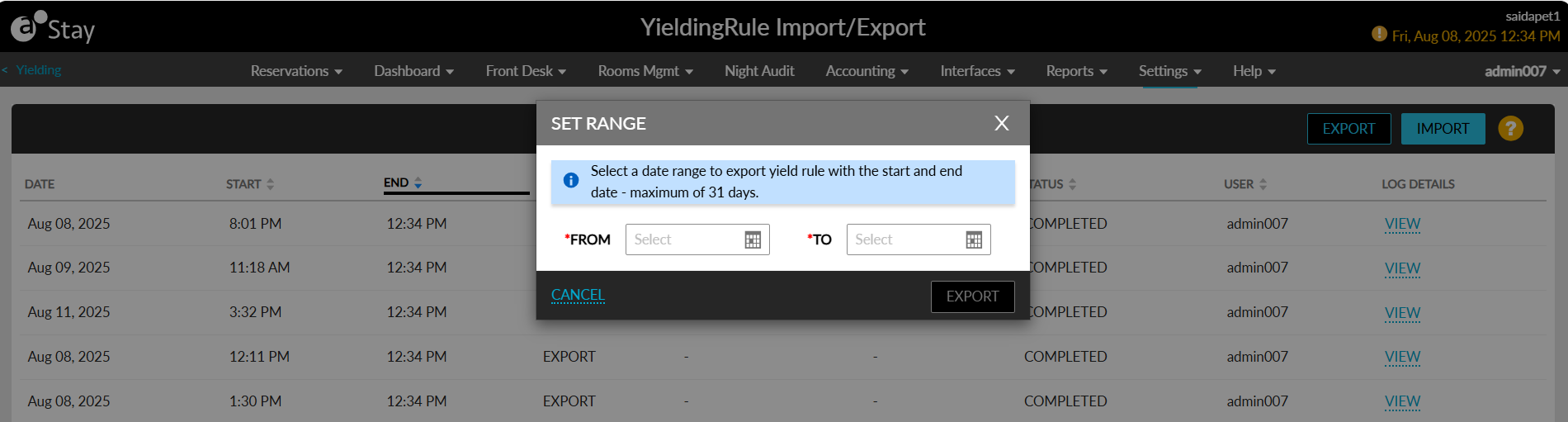
The From Date and To Date columns in the Yielding Rule Import/Export screen displays the start and end dates selected when exporting the yield rule sets.
